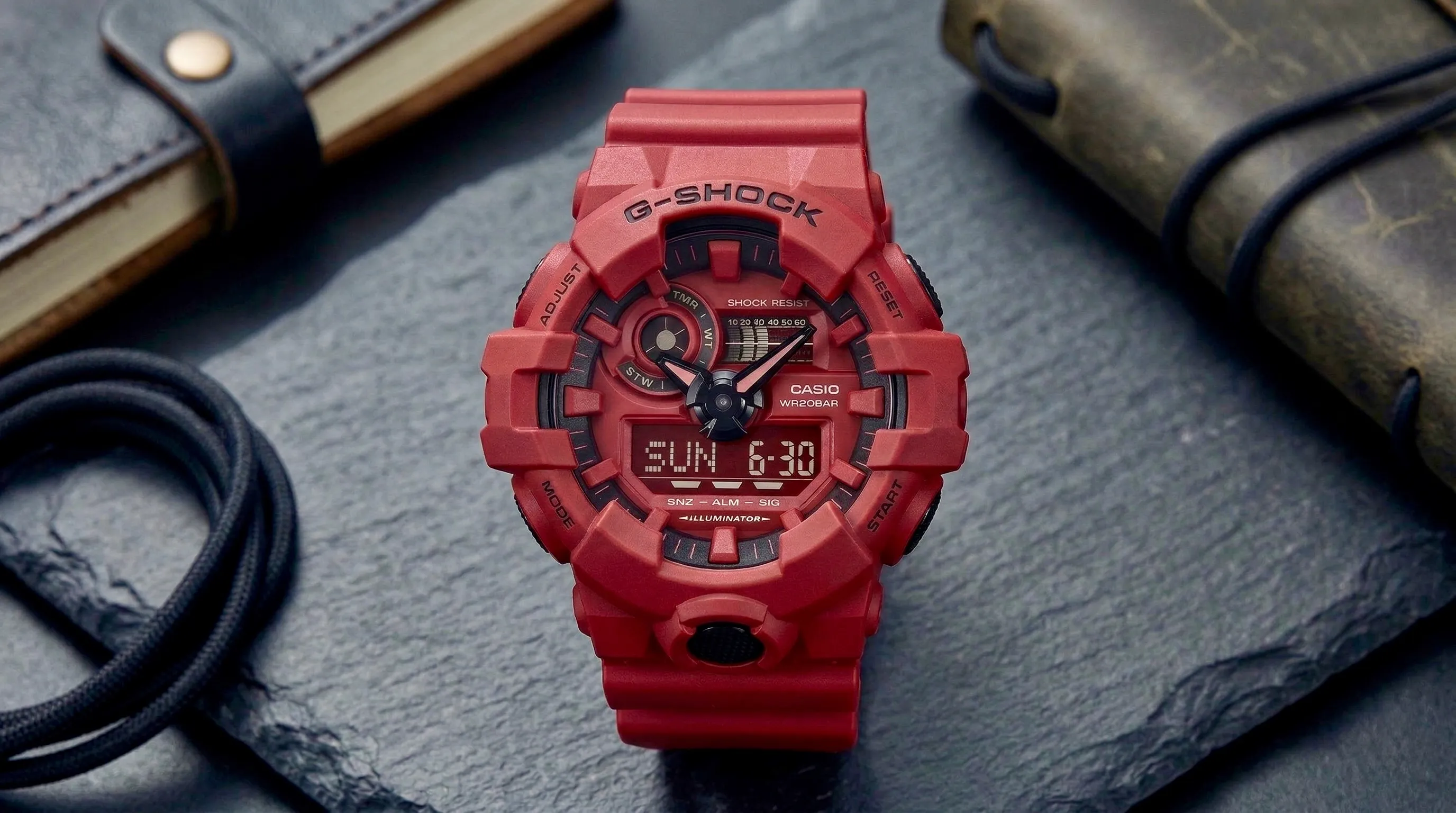
I was at the airport with twenty minutes to boarding when I tried to set my watch to local time. It's a Casio G-Shock GA-700, shock-resistant, water-resistant to 200 metres, the kind of thing a military contractor might spec out. I pressed MODE. The display shifted. I pressed it again. Something changed, though I couldn't say what. I tried the top-right button and got nothing I could interpret. After a minute of this I gave up and searched "GA-700 change time" on my phone. The search was faster than the watch. For a product this well engineered, that's a strange thing to have to admit.
The watch has no excuses
The G-Shock line goes back to 1983, and the GA-700 sits in its mainstream, mass-market tier: World Time across 48 cities, a five-alarm system, stopwatch, countdown timer, 24-hour toggle, automatic DST. On paper it's a serious instrument. The interaction design hasn't kept pace with the feature list, and the distance between what the watch can do and what you can figure out how to do is the part worth examining.
The problem is the mental model, not the buttons
Every physical control surface relies on a mental model: the rough theory you build of how a thing works before you touch it. The G-Shock's falls apart on contact. There are four buttons, one in each corner, and each does something different depending on which of the five modes you're in (Timekeeping, World Time, Stopwatch, Countdown Timer, Alarm), with no rule connecting those behaviours. There's no grammar to the interface, nothing you can learn once and reapply. You memorise each mode on its own terms, which is a lot to ask of someone who just wants the right time. The analog hands sitting over the digital display add a second timekeeping element the interface has to reconcile, and the buttons do nothing to clarify how the two relate once you start changing things.
Watch it fail on the most common task: setting the time. To Casio's credit, the display names the mode you're in. That's a real piece of feedback, and it's where the help ends. Editing anything from Timekeeping mode starts with holding ADJUST for about two seconds. A small "SET Hold" indicator does surface, but it's easy to miss against the analog hands, and nothing on the case or screen signals that a hold behaves differently from a press. A near-hidden gesture guards the one thing most people open the watch to do. Once you're in, the buttons change jobs again: one steps through fields, one increments, one decrements. The display never maps which is which. You press, watch what happens, and correct.
The World Time feature, the one aimed at travellers, lives behind the same sequence. The function most likely to be used somewhere unfamiliar demands you already know the ritual before you use it.
The watch does confirm changes: the field you're editing flashes, so you can see which value is live. What it never shows is which button acts on that value. You can watch the minutes blink and still not know whether the top-right button raises them, lowers them, or does nothing at all. The state is visible. The path to changing it is not.
Two well-worn principles explain why this lands hard. Nielsen's sixth heuristic, recognition rather than recall, asks interfaces to keep actions and options visible so users aren't forced to remember them (Nielsen Norman Group, 1994). The GA-700 asks for the opposite: full recall of button behaviour across five modes and two states, with no recognition support. Norman's Gulf of Execution describes the gap between knowing what you want and knowing what to do about it (Norman, 2013). Here that gap is structural: you know you want to change the time, and the watch gives you no discoverable path to the action.
Is the opacity a mistake?
Before calling this lazy design, it's worth asking whether it's deliberate, because some of it clearly is. A G-Shock is built to be hit, dropped, submerged, and worn with gloves. Recessed buttons that resist casual presses are a genuine feature. You don't want your watch dropping into Stopwatch mode because you knocked your wrist against a doorframe. The hold-to-edit gesture follows the same logic: making the most consequential action harder to trigger by accident is a reasonable thing to want.
A guard against accidental edits is defensible. A guard with no signifier and no confirmation is not. Casio could have kept the deliberate hold and still told the user it exists, and still shown them the moment it activates. The protection and the communication were never a package deal. The GA-700 ships with the guard and without the signal.
Constraint or cop-out
The real constraints deserve naming. A monochrome LCD with limited pixels. No touchscreen. A sub-$100 price on most models. Firmware shared across dozens of variants. A global audience with no common language. These are legitimate parameters and they rule out some easy answers.
They don't explain the era. The GA-700 launched in 2016. App-configured budget smartwatches had existed for years by then, and Casio's own Bluetooth G-Shocks had been pairing with phones since 2012 (the GB-6900). The GA-700 has none of it: no Bluetooth, no companion app, no software path around the buttons. The physical interface carries the entire load. That raises the bar for getting the physical interface right rather than lowering it.
Does this actually matter to Casio?
The watch sells. It sells well, and it has for years, opaque buttons and all. Setting the time is something most owners do a handful of times a year, usually crossing a timezone or after a battery change. By the logic of effort against frequency, this isn't worth an engineer's afternoon.
That's the argument a good product manager would make. Two things tilt it.
First, the pain clusters at the exact moment the brand makes its strongest promise. World Time is marketed to travellers, and travellers hit the wall hardest, in the moments they're already stressed. A feature that's most awkward precisely when its target user needs it is a marketing claim quietly undercutting itself.
Second, the highest-value fixes are cheap. If closing this gap required a hardware redesign, I'd drop it down the backlog too. It doesn't, and that changes the calculation.
What I'd change, in order
Contextual button labels
Small per-button indicators on screen showing each button's current function. Digital cameras have done this since the 1990s, hardware synths do it, and Casio's own ProTrek watches do it. Even single characters inside the existing LCD footprint (an up arrow for increment, a down arrow for decrement, a return symbol for stepping fields) would close most of the Gulf of Execution, provided the segmented display can render them. A monochrome LCD only shows the shapes its segments were tooled for, so this is the cheapest fix if the existing segments allow it, and a hardware question if they don't. Cheapest plausible option, highest return.
Sharper edit-state signalling
The active field already flashes, but it competes with the analog hands and a dense display, so the signal is easy to lose. Make the edit state unmistakable, separate viewing from editing more clearly, and indicate which button advances fields. The confirmation exists; the work is making it legible at a glance. Almost as cheap as the labels, again if the current segments allow it.
Reverse mode scrolling
Let a hold cycle modes backward. Overshooting World Time shouldn't cost four presses to lap back around.
Bluetooth and an app
Casio has shipped this on higher-end models for over a decade, so it's neither novel nor risky. App pairing lets owners set alarms, timezones, and everything else from a phone in seconds. The largest investment, and the one I'd reserve for a future revision rather than expect on a refresh.
The takeaway
The GA-700 is an excellent watch. It will outlast most of the electronics in your life. So why ship it this way, if the highest-value fixes are cheap? Because nothing forces the question. The watch sells regardless, the firmware is shared across dozens of variants where any change has to be re-verified, and the cost of the opacity lands on owners in scattered minutes of fumbling that never register in a return rate or a review score. That is what interaction debt looks like: patterns set in the 1980s still shaping how a 2016 product behaves, not because anyone defends them but because no metric ever demands they be revisited. Owners reaching for Google instead of the watch in their hand are not solving a documentation problem. The interface is admitting it can't be learned by use. The engineering got the attention it deserved. Discoverability is still waiting its turn.
Sources
- Nielsen, J. (1994). 10 Usability Heuristics for User Interface Design. Nielsen Norman Group.
- Norman, D. (2013). The Design of Everyday Things (Revised ed.). Basic Books.
- Nielsen Norman Group. (2012). Recognition and Recall in UX.
- Nielsen Norman Group. (2020). Visibility of System Status: The Most Important Heuristic.
- Casio Computer Co. (2016). G-Shock GA-700 Operation Guide, Module 5522.