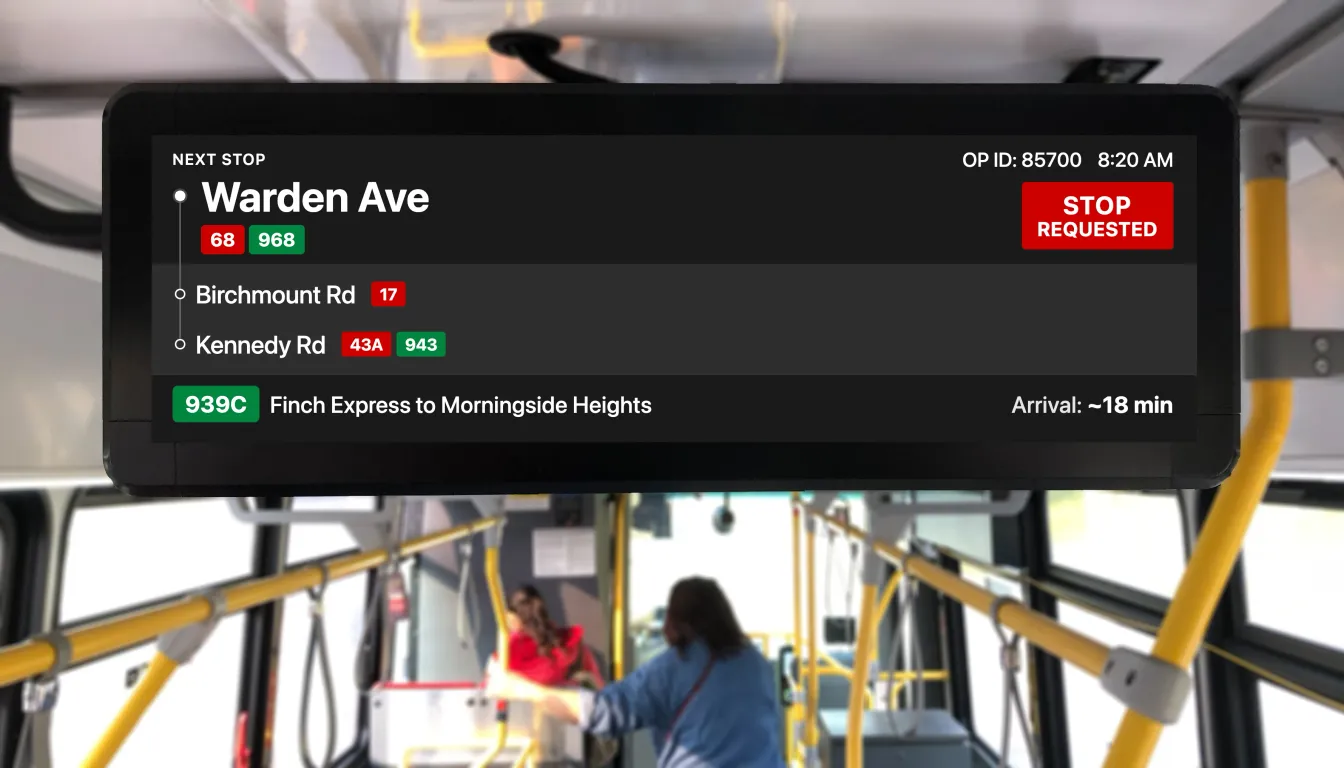
Fig 1.0: Proposed redesign of the TTC bus Passenger Information Display (PID)
At a glance
- Field observation across 6 routes revealed riders pressing the stop button multiple times, not from impatience, but because visual confirmation disappears into a rotating display before they can verify it
- The proposed solution is a persistent badge that remains visible outside the content rotation: a software-only approach that closes the persistence gap without disrupting route information
- An external designer (me) and the TTC team independently identified the same structural problem and converged on adjacent solutions.
A persistence problem with stop request feedback
Research revealed that the stop request feedback has a core problem: the confirmation cycles away before riders can verify it.
Video 1.0: The persistence issue captured. Stop request confirmation disappears into the display rotation
Confirmation disappears into rotation
The display rotates through five information types, dwelling on each for about five seconds, making a full cycle of roughly 25 seconds. When a rider presses the stop button, “Stop Requested” joins that rotation and is treated like any other content tile.
A rider who looked up at the wrong moment saw no confirmation at all. To verify their stop was registered, they had to stay fixed on the screen.
“I saw it say stop requested for a second, then it switched to something else. I'm not sure if the stop request is still active.”
Rider during interview, 939 Finch Express
Rider presses stop button
Physical press registers with the system
Auditory chime plays
Confirms press was registered
Visual confirmation appears
Display shows "Stop Requested", visible for ~5 seconds
Display cycles to other content
Confirmation disappears; rotation resumes (next stop, current time, operator id etc.)
"Did it work?" Rider glancing at screen sees no confirmation. Uncertainty window: the re-press risk is highest here.
"Stop Requested" re-appears
The rotation cycles back through other content before the confirmation returns; by then many riders have already re-pressed.
Non-persistent confirmation fails under glance-based conditions
Riders glance at displays for a few seconds at most. When the “Stop Requested” message cycles away into the rotation, riders who look up at any other moment see no confirmation at all. This is what triggers the repeat press.
More critically: a rider who missed the auditory chime has no reliable way to verify their stop was registered. Persistent visual confirmation would reduce that reliance on the chime for deaf, hard-of-hearing, and headphone-wearing riders. My sample did not include enough of these riders to prove that benefit, so I treat it as the rationale behind the proposal, not a validated result.
How I structured the research
I chose field observation over surveys or analytics because the behaviour I was investigating only makes sense in context. You need to see where the rider is looking, how long they wait, and what the display is showing at that moment to understand what drives a repeat press. Surveys would have captured perception; observation captured the actual decision sequence.
6 routes over 3 weeks
- Routes: 29 Dufferin, 939 Finch Express, 54 Lawrence East, 95 York Mills, 102 Markham Road, 133 Neilson
- Tracked button, stop button press, wire pull frequency and display state
8 riders, in-context
- Recruited riders observed pressing the button/ pulling the wire, then interviewed after leaving the bus
- Short semi-structured interviews (3–5 min)
- Focused on: certainty of registration, what cues they used, and what would help
- Themes synthesized through affinity mapping
The goal at this stage was a hypothesis, not a population estimate
Eight interviews and six routes are sized to identify a behavioural pattern and form a design hypothesis. That is the scope this phase was designed for. Generalising across the TTC network is what a pilot evaluation would do, and the pilot is designed in a later section to generate the statistical evidence this exploratory phase does not claim.
Why other approaches fall short
Before settling on the persistent badge, I evaluated three other software-only approaches against one requirement: a rider must be able to confirm their stop is registered in a single glance, at any point after pressing the button.
Larger / brighter "Stop Requested" text
Increasing size or contrast addresses salience, not persistence. A larger message that disappears in five seconds still cannot be verified during a 25-second rotation cycle.
Extended rotation dwell time
Keeping "Stop Requested" on screen for longer, say 10 seconds instead of 5, still cycles away eventually. Any approach that enters the rotation queue will eventually disappear. Extending dwell time also delays the route and stop information riders need.
Full-screen takeover on button press
Replacing the entire display with "STOP REQUESTED" for 5–10 seconds guarantees visibility but blocks all other information. Confirmation should be additive.
Each of these fails for the same structural reason: they treat “Stop Requested” as content to be displayed rather than a persistent state to be communicated. Fixing the salience or duration of something that still disappears does not solve the problem.
Persistent badge outside the rotation
The core proposal is accessibility-first: a dedicated zone outside the content rotation that stays visible until the bus reaches the stop. For deaf, hard-of-hearing, and headphone-wearing riders who cannot rely on the auditory chime, a persistent visual state is a way to reduce that reliance; everyone else gets fewer repeat presses as a downstream effect. The accessibility benefit is the rationale for the proposal, but my sample did not include enough of these riders to prove it out. The pilot is where that gets tested.
Inclusion principle for the core proposal: it must use only data already on the vehicle. That keeps the persistent badge software-only in principle, pending firmware confirmation, and avoids waiting on a new data integration. Two adjacent ideas surfaced (transfer connection chips and a destination arrival time), each needing a new on-vehicle data feed. Both are noted as feasibility-contingent additions rather than padded onto the core proposal.
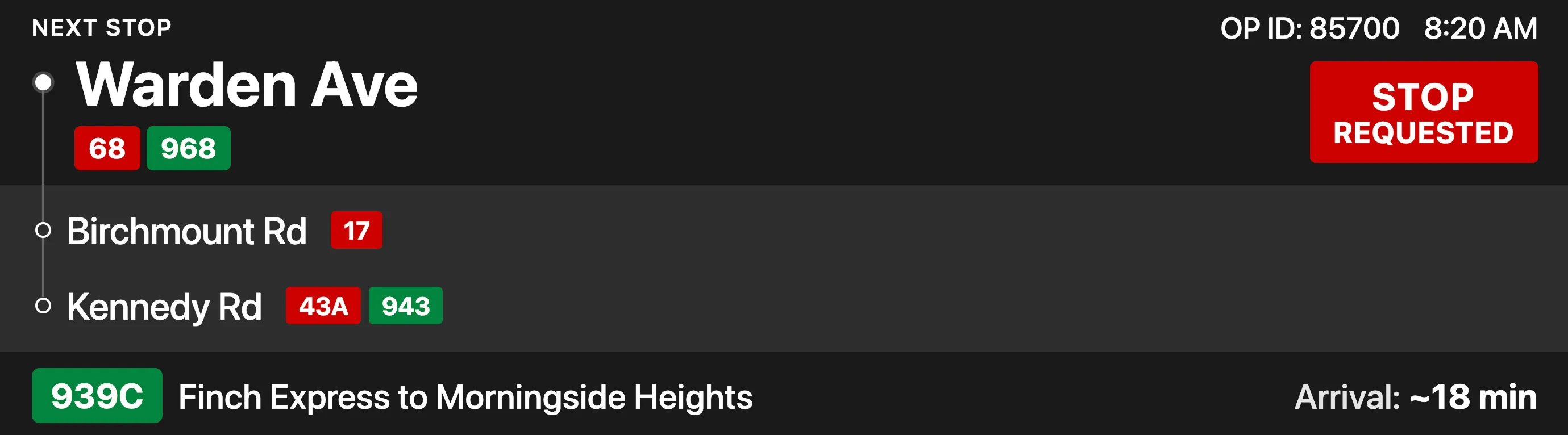
Fig 2.0: Proposed display mockup. The persistent badge is the core software-only fix; the transfer chips and destination ETA visible in the same frame are feasibility-contingent additions that each need a new on-vehicle data feed.
Current and Proposed
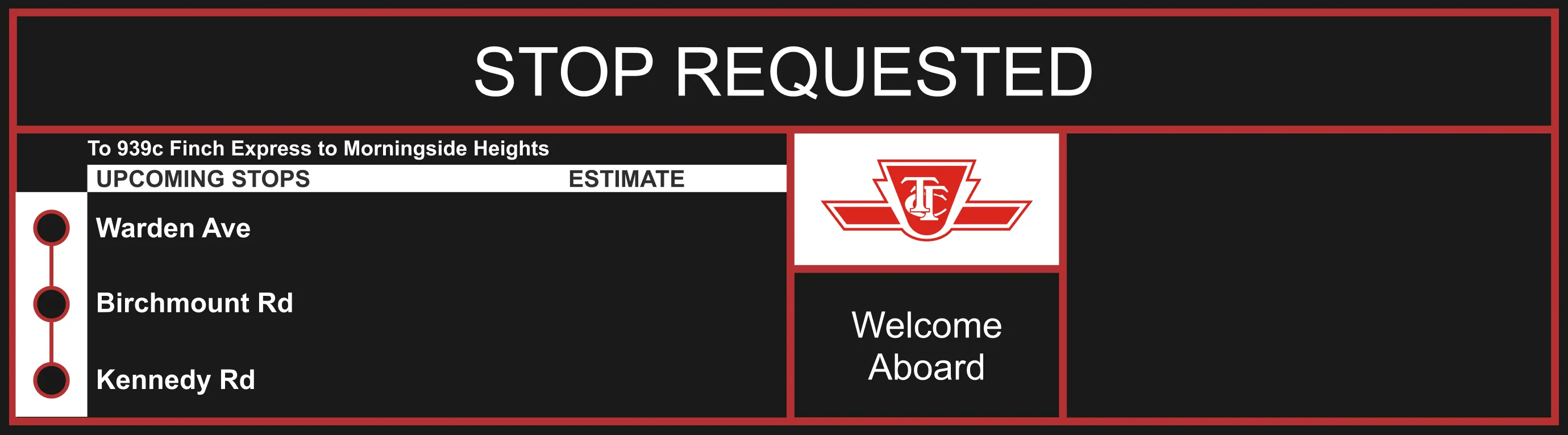
Fig 3.0: Drag to compare the current rotating confirmation vs. the proposed persistent badge
Critical Assumptions
- Riders glance at display within seconds of pressing button (observed)
- Repeat presses track uncertainty rather than impatience (interview-supported association, not a controlled result)
- Badge is understood without explanation (early concept review, n=4 on an iPad)
- Display firmware supports dynamic zone allocation
- Persistent badge won't create alert fatigue over time
- Badge remains legible under all lighting conditions
What would invalidate this model
If repeat press behaviour persists after badge deployment, the problem is not visibility. Riders may not trust any system feedback regardless of persistence. That would be a different problem requiring different research.
Known risks and edge cases
- Visual crowding during high-density information states
- Badge habituation risk over time reducing attention value
Why the proposed design works better
The redesign applies established UX principles to reduce cognitive load and improve at-a-glance comprehension for riders in a moving vehicle.
Persistence over rotation
- "Stop Requested" displays as the next rotation item, then cycles back with all other content
- Riders must watch and wait for it to reappear
- Forces recall of whether they saw it
- Persistent badge stays visible from the moment the button is pressed
- Rider can verify in a single glance at any point
- Relies on recognition instead of memory
Visual hierarchy
- All content competes at equal weight inside a single cycling header
- Stop name, time, and "Stop Requested" share the same visual treatment
- Three distinct zones (primary, upcoming, route) use size, weight, and spatial separation
- Clear reading order where the next stop is always the largest element on screen
Concept Validation
Four commuters reviewed current and proposed mockups shown on an iPad, providing an early read on whether the redesign resolved the core confusion.
All four located the persistent badge and understood the request was still active, without explanation. This is a comprehension signal from an iPad prototype, not proof of in-vehicle behaviour.
On-vehicle behavior under real lighting and motion; long-term habituation effects; interaction with service alerts
Sufficient confidence to propose a controlled pilot, not full fleet rollout; pilot design must address remaining uncertainties
Press STOP to compare how each display responds
Fig 4.0: Press STOP to compare. Current display cycles “STOP REQUESTED” with other content; proposed keeps it persistently visible
Pilot evaluation logic
The pilot never ran. This is the validation plan I would propose to the owning team to generate the statistical evidence the directional research deliberately did not.
Where this landed
I had no warm introduction to the TTC. I published the case study and routed it through TTCriders.ca (opens in new tab), the rider-advocacy group whose audience overlaps with people who could pass it to the right internal team. In late 2023, a meeting was arranged by TTCriders.ca with the TTC employee responsible for the PID.
The meeting was corroborating: the internal team had independently identified the same structural problem and was exploring adjacent solutions, including a unified design system aligned with Metrolinx. Two people arriving at the same framing from different starting points is a strong signal that the persistence diagnosis was correct. It corroborates the problem, not the proposed interface, which would still need an on-vehicle pilot to validate.
It also reset how I approach civic work. I now check whether the owning team is already moving before investing weeks of research. Inside a design org I would have run a parallel feasibility track in week one. One engineering conversation early would have firmed up the “software-only” claim before the proposal was written, not after.
What I learned
Repeated behaviour is rarely impatience
Riders pressing the stop button twice were giving the system rational feedback: the first press produced no lasting confirmation, so the second press was a reasonable hedge. Designing to reduce repeat presses means designing to earn trust on the first press.
What I'd do differently
Validate the software assumption earlier
One conversation with an engineering contact before finalising the proposal would have firmed up the "software-only" claim. I wrote the proposal, then discovered the firmware dependency was an open question.
Lead with network-level impact, not individual rider frustration
The case for this work is strongest at network scale, where even a small per-rider reduction in repeat presses compounds across a high-frequency system. I buried that argument. It should have opened the proposal.
Recruit accessibility participants from the start
My sample skewed toward riders without sensory or mobility constraints. Deaf, hard-of-hearing, and low-vision riders are the population the persistent badge most benefits. The next round would oversample them.
The bigger picture
Influence in civic UX looks different
There is no product-org hierarchy to escalate through and no roadmap to get onto. Publishing the case study and routing it to a community that could forward it internally was the only path to a conversation with the team that owned the display. The TTCriders.ca route worked.